Hi @Elena_ Thanks for the screenshot, it's helpful to see what you are looking at.
The first image (webinar will start in 9 days) is what attendees see if they select 'join webinar' from the confirmation email prior to the start of the webinar, this can not be customized.
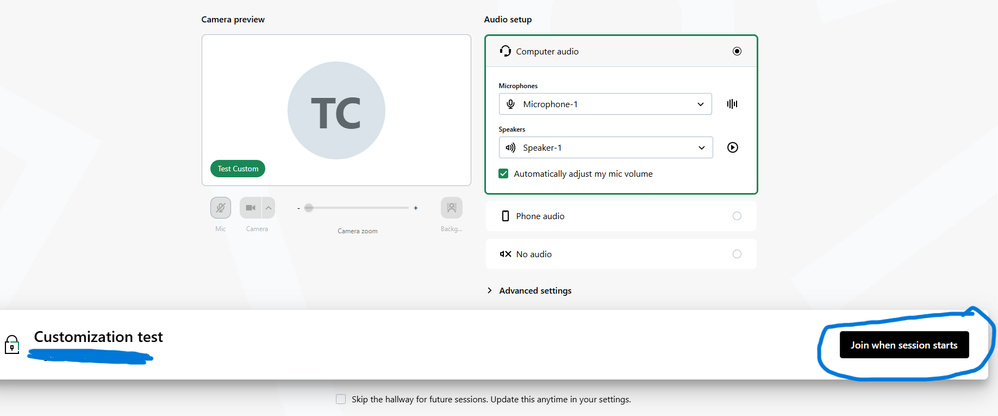
Prior to start of the webinar, usually when the organizer's have yet to click "Start My Session", attendees are taken to the Hallway, which can not be customized. They are given the option to test their audio, and then join when session starts:
That will take them to the waiting room. It will share the branding images you uploaded for the registration page as well as any speaker(s). At this time, it will not share branding colors.
I see from your registration page that you have added branding images, which will be shown in the waiting room. If you want to add speakers, you can do this in the Event Details page and then under settings:
Let me know if you have any questions or need further clarification. In addition, if you have any feedback, I'm happy to pass this on to the team.
Hi all! Could you explain me please how can I customize the waiting webinar page?Look screenshot what I have now
Hi @Elena_
Welcome to the community. We are having issues with our platform and your question didn't come through. Can you post your question again? I apologize for the inconvenience.
In the meantime, there shouldn't be any limitations during a trial period with customizing the waiting room. You can find out more information here.