Hi, I'm Laurel from the Digital Success team at GoTo. One of the things I genuinely love about this community is that you tell us exactly what you need, and today, I get to share that we were listening.
Two of the most requested device management improvements are now live in GoTo Admin, and both came directly from your feedback. Let's get into it.
You Asked for Button Templates. We Delivered.
"GoTo is our favorite platform offering for our clients. We have about 1,200 seats installed with over 80 different clients. Do just one more thing... make a button programming template that can be copied to other devices! We are currently programming another install with 73 seats with 20 buttons apiece!"

We heard you. Device Button Templates are now available in GoTo Admin.
Configure your buttons once, save it as a template, and apply it across your devices. Templates are found under Settings in GoTo Admin and can be applied directly from the button configuration tab on any device. No more repeating the same setup manually across every phone on an account.
One thing worth knowing: if a button in your template isn't supported by a specific device, it simply won't be applied — no errors, no disruption.
What's coming next
The team is already working on what you'll want next: bulk application of button templates across multiple devices at once, and the ability to set a default template that automatically applies when a new device is created or activated. These are the next items on the roadmap.
⚙️ Create phone button configuration templates
️📋 Set up a phone's button configuration
Organizations Never Stand Still. Device Management Shouldn’t Slow You Down.
In many organizations roles shift and people move, but devices need to follow the work — not the person. This came through loud and clear, specifically from school districts, where phones are tied to classrooms and buildings, not individuals. When a teacher's classroom assignment changes, everything tied to that phone — the extension, button configuration, and routing — needs to move with it. That kind of flexibility shouldn't require hours of manual work.
It's a challenge that shows up everywhere: dealerships, doctor offices, multi-location businesses. Anywhere people are on the move, device management needs to keep pace.
As GoTo Admin has continued to evolve, device reassignment has been one of the most requested additions. We didn't just close that gap; we made the entire experience significantly better.
Device Swap is now live in GoTo Admin.
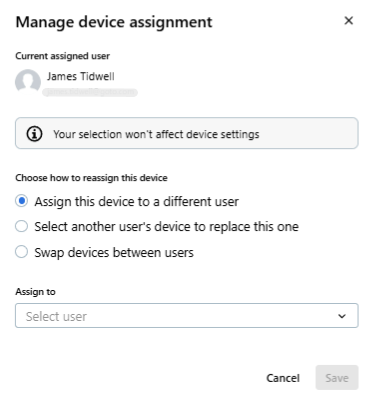
You can now reassign devices between users while keeping extensions, button configuration, and device settings fully intact. Here's what that looks like in practice:
- Move a device to a new user while preserving all settings
- Swap devices between two users — settings stay, users switch
- Convert a device to standalone — unassign the user but keep the configuration parked and ready
- Assign a standalone device to a user with a single click
GoTo Admin walks you through any licensing or extension decisions along the way. No manual reconfiguration. No workarounds.
What's coming next
The team is already working on making hardware replacements just as seamless. Soon, when an admin needs to replace a physical device, the settings, extensions, and button configuration from the original device will automatically carry over to the new one
📞Manage device assignments in GoTo Admin
Your Feedback Builds What Comes Next
Both of these features came directly from you through surveys, conversations, and community submissions. If there's something GoTo Connect isn't doing yet that would make a real difference in how you work, share it with us here 👉GoTo Connect Ideas
What are you hoping to see next? Drop it in the comments.